

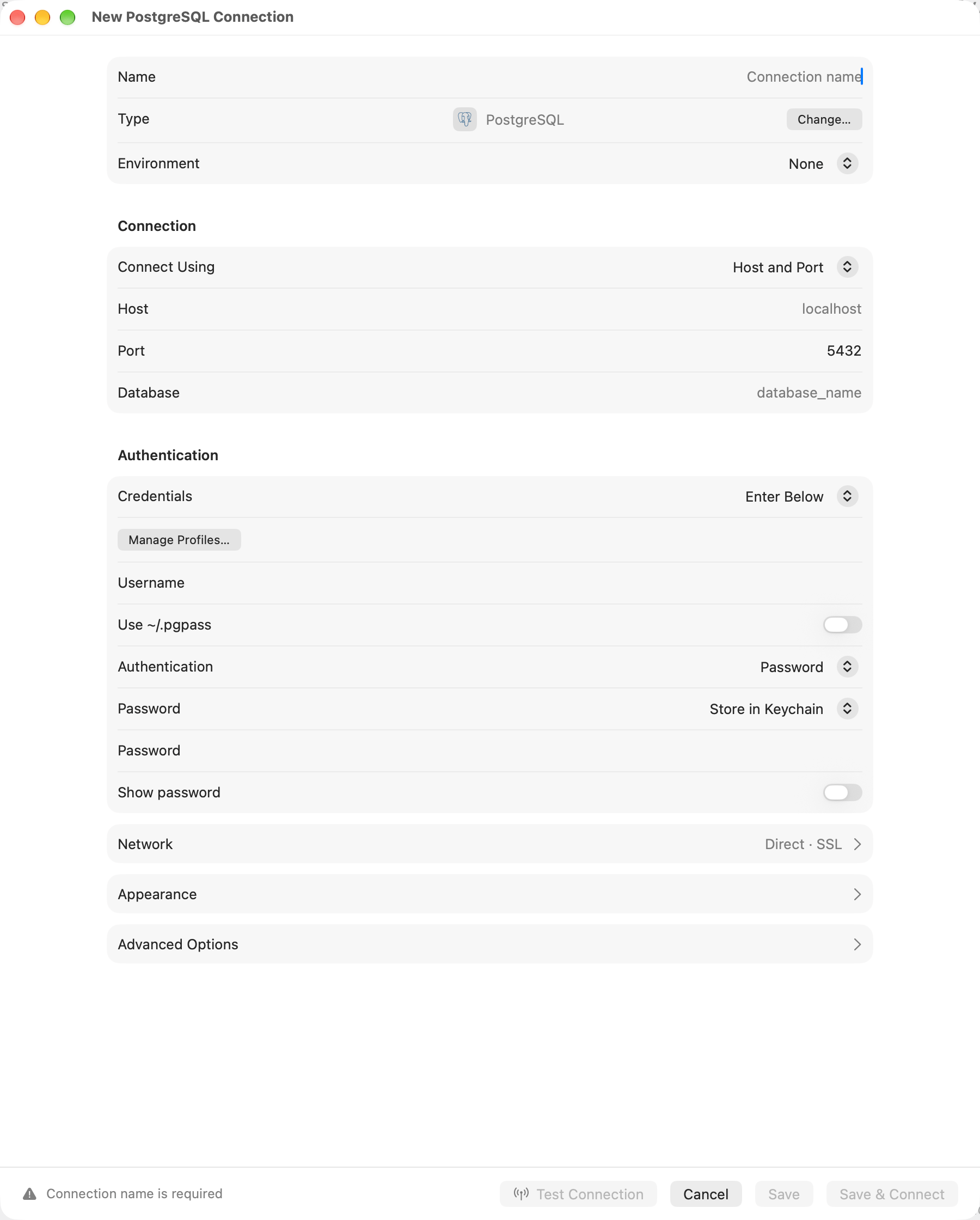
A PostgreSQL connection, with Network, Appearance and Advanced Options collapsed
General stays open. Network, Appearance and Advanced Options start collapsed and open when you click them; a section opens on its own when the connection already uses it, or when a required field inside it needs fixing. The collapsed Network row shows the transport and whether SSL is on.
The bar along the bottom carries Test Connection, Cancel and Save, plus Save & Connect on a new connection and Delete on a saved one. The space to their left holds the reason Save is dimmed, prefixed with the section that holds the empty field, or the warning the last test brought back from the server.
General
SQLite, DuckDB, libSQL, and Beancount replace the host fields with a file path. Browse… picks a file that exists. New… names one that does not, and the file is made when you connect; Beancount opens only an existing ledger, so it has no New….
Sign-ins from this Mac
Before an imported or synced connection uses this Mac’s cloud credentials or Kerberos tickets, review Sign In with Credentials from This Mac?. The dialog names the destination and sign-in method. Click Sign In to approve that use. Links, Linked Folders and Team Library connections follow the same rule. Approval stays on this Mac and covers the connection, destination and sign-in settings shown. A new destination or added credential use asks again. A background reconnect cannot grant approval: open the connection yourself to review it.Network
Connect via is a single choice, and the fields under it belong to whichever transport is selected. A connection uses one transport or none.
Leave it on Direct unless the database is unreachable from this Mac. Switching to another transport keeps what you typed into the previous one, so switching back costs nothing.
A connection set to Socket on General offers only Direct, since a tunnel cannot reach a socket file on this Mac. A PostgreSQL socket also has no SSL settings.
Socket Path, under SSH Tunnel, forwards to a unix socket instead of Host and Port, which are then unused. See Forwarding to a unix socket.
Encryption sits below the transport. SSL/TLS covers the modes and the certificate fields.
Options
Click Advanced Options near the end of the form to reveal these fields. Safe Mode, Manual Commit, AI Policy and External Clients share the Access section.
The connect timeout is one deadline for the whole network attempt, not a new timeout for each step.
It includes the selected SSH tunnel or proxy, TCP, TLS and database authentication. Local SQLite and
local libSQL file opens have no network deadline. If an SSH bastion stalls, the timeout error names
that server rather than the database behind it. Reconnect after changing either timeout so the open
session picks it up.
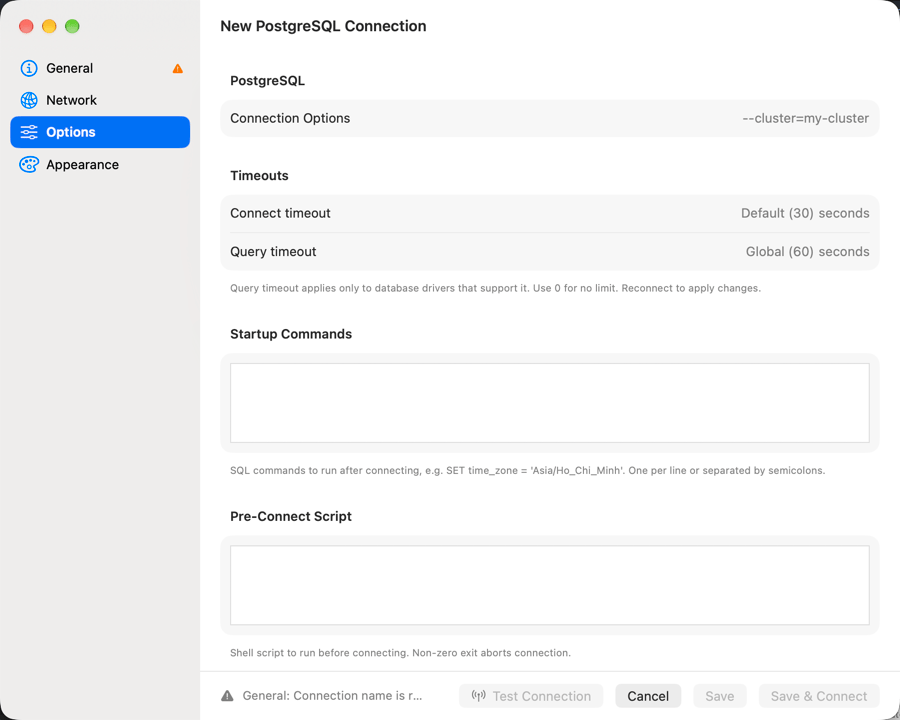
Per-connection timeout overrides under Options
Appearance
Icon replaces the database logo in the connection list, Switch Connection, the connections strip and the toolbar. Click it, type to search the symbols, then click one or pressReturn. Default brings the logo back. The database type stays in the row’s tooltip.
Color marks the connection in the connection list and its window. Tags and Group decide where it sits in the welcome window’s tree.
Type a tag’s name in Tags and press Return to add it: known tags complete as you type, and a new name becomes a new gray tag. Select a tag and press Delete to remove it. The tag menu beside the field shows each tag’s color, and holds Create New Tag… for a tag with a color of your choice and Manage Tags to delete one.
Startup commands
Statements split on semicolons and newlines outside quotes and comments, and run in order on the connection that just opened, after every connect including an automatic reconnect. They all run on one connection, so write one dialect.Connection scripts
Put whatever has to happen before the database answers in Pre-Connect Script: a VPN profile coming up,aws sso login, a credential refresh. The script runs in bash, and a non-zero exit stops the connect with the script’s standard error in the message. Homebrew’s /opt/homebrew/bin and /usr/local/bin are on PATH even when TablePro was opened from the Dock.
Both scripts get the connection in their environment, so one script can serve every connection that needs it:
The password is never passed.
Connection health
Every active connection is checked on the interval set by Check connections in Settings > General, every 30 seconds by default, and the check is skipped while any query, export, import, or other tracked operation is running. A failed check starts a reconnect: the rows stay on screen and the connection tries 10 times over about 10 minutes before it shows as lost. An authentication failure stops the retries and shows the connection as lost at once. So does a TLS failure that needs an edit to the connection: TLS off where the server requires it, TLS on where the server refuses it, a client certificate the server requires, or a client key that cannot be read or decrypted. A server certificate that fails verification or does not match the host keeps the retries going, and the reconnect bar names that certificate error as the cause in place of a generic one. A reconnect rebuilds the tunnel, restores the selected database and schema, and re-runs the startup commands; the connection shows as reconnecting throughout. The check is a query, so on a database that sleeps when idle or bills per query it is not free. Only when I use the connection stops it: TablePro sends nothing on its own, and instead checks the connection the first time you use it after five quiet minutes. Waking the Mac from sleep counts as a quiet period, so the first thing you do after opening the lid checks too. A Server Dashboard tab keeps its own refresh running on its own interval, which Check connections does not change. Close the tab or set its interval to Off. SQLite, DuckDB, Beancount, Snowflake, and Teradata are not checked. Metadata connections are the extra ones opened to read a database’s object list and structure. While many reads run at once, as after a Refresh with many databases expanded, more than six can be open; as that work ends, a connection closes the ones unused longest until six are left. One left unused for 10 minutes closes and reopens on the next read.Which drivers get which transports
SQLite is the one driver offering Remote Database File; it reaches an SSH server without forwarding a port. A driver with no SSL/TLS column is either a local file or an HTTPS API that manages its own encryption. SSL/TLS has the per-driver defaults.