

kubectl port-forward running in a terminal is a window you cannot close for as long as you need the database, and a tab you have to notice when it dies. Move it into the connection and it starts on connect, stops on disconnect, and comes back on its own.
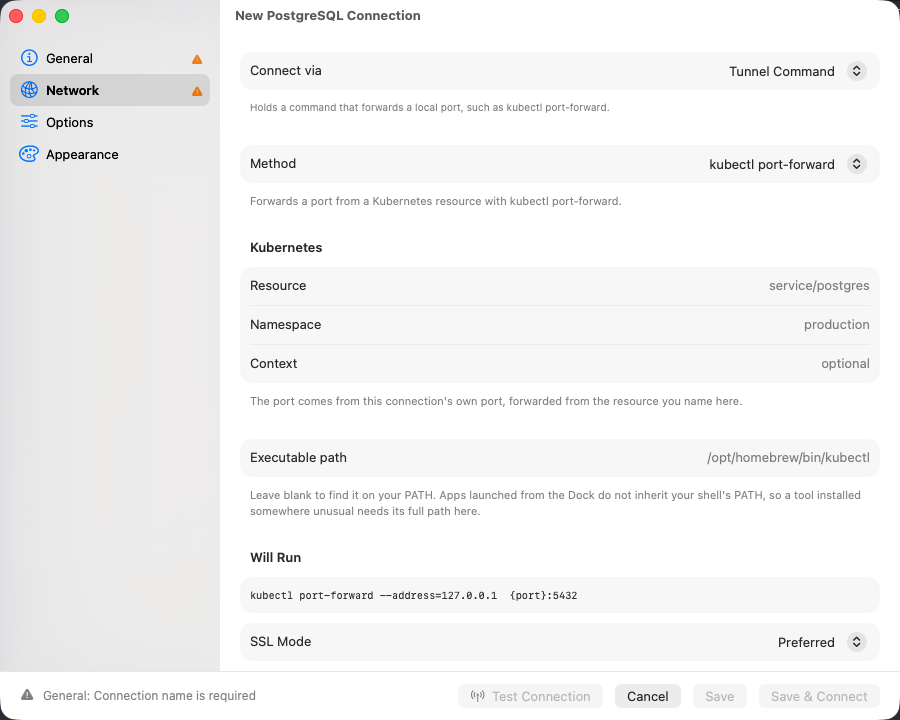
The kubectl preset, with the argument list it will run underneath it
Setting up
1
Choose the transport
On the Network tab, set Connect via to Tunnel Command. A connection uses one transport, so choosing this one switches off whichever was selected before.
2
Pick a method
kubectl port-forward and AWS SSM Session ask for the two or three things that vary. Custom Command takes a command line.
3
Read the Will Run section
It shows the exact argument list, with
{port} standing in for the port that gets allocated on connect.4
Test it
On General, click Test Connection.
Methods
Pick a preset if one fits. A preset takes named values rather than a command line, so nothing typed into it can turn into an extra argument, and the values travel between machines that have the same tools installed.
Where the tool comes from
Both presets look the tool up onPATH, with /usr/local/bin and /opt/homebrew/bin added, because an app started from the Dock inherits a minimal PATH rather than your shell’s. Executable path overrides that with a full path.
An SSM session also needs the Session Manager plugin, which the AWS CLI finds the same way.
Custom commands
Three placeholders are substituted before the command runs:$HOME stays four characters and * stays one. For environment variables, start the command with /usr/bin/env:
While the connection is open
The process is held for the life of the connection and killed with its whole process group on disconnect, which is what takes anaws ssm session’s helper down with it. If it exits on its own while the connection is still open, the connection reconnects and starts it again, up to ten attempts with a widening delay. That covers an SSM session hitting its idle timeout and a kubectl port-forward losing its pod.
The local port shares the connection’s Connect timeout under Options, which uses 30 seconds
when empty. Past that deadline the connect fails, and the error carries the last lines the command
printed to standard error, which is usually where the real reason is.
SSL/TLS still applies, with one unavoidable adjustment: the driver dials a loopback port that no server certificate names, so Verify CA and Verify Identity fall back to Required and certificate paths are dropped.
Sharing a connection that has one
A tunnel command travels under tighter rules than the rest of a connection.
Editing
connections.json by hand is detected, and a connection whose command arrived that way refuses to run it until you open the connection in TablePro and save it again.
Troubleshooting
kubectl was not found
The tool is not on thePATH an app inherits. Run which kubectl in a terminal and put the answer in Executable path.
The tunnel command exited before the port was open
The command failed on its own terms and its output follows the message. A wrong namespace, an expired credential, and a resource that does not exist all land here. Run the same command in a terminal to confirm.The tunnel command did not open its local port in time
The connection’s Connect timeout passed with the process still running and nothing listening. An SSM session waiting on a target that is not registered with Systems Manager behaves this way, as does akubectl context pointing at an unreachable cluster.