

sort: true, and a column header that refuses to sort is the schema saying so rather than the grid. Typesense 26.0 and later are supported, over the REST API.
The Typesense driver is not in the app. Picking Typesense in the Choose a Database sheet offers the
download before the form opens, and opening a saved Typesense connection installs it without asking.
See Plugins.
Quick setup
Click New Connection…, select Typesense, enter host, port and the API Key the server was started with, then click Save & Connect. There is no Database field. One connection reaches one cluster and its collections are the objects. For a node on a private server, open the Network tab and set Connect via to SSH Tunnel, then set Host to the address Typesense listens on as the SSH server sees it, usuallylocalhost. See SSH Tunneling.
Connection settings
Connection URL
Typesense has no URL scheme of its own, so there is nothing to import or export. Enter the host, port and key on the form.Authentication
The API key is the whole credential. Typesense has no user accounts, so the form drops the Username and Password rows and shows API Key in their place. A scoped or search-only key restricts what the connection can reach. The sidebar readsGET /collections, so a key without collections:list opens a connection that shows no collections; the admin key or a key holding collections:* browses everything.
Browsing collections
Collections are tables and documents are rows.id leads every grid, is the primary key, and is read-only: Typesense refuses to rewrite a document’s id.
Columns come from the collection schema. An object field flattens to its dotted leaves, so meta.pages is a column and meta is not, and array and object values render as JSON in the cell. A leaf of an object[] field is a column of its own (variants.sku) holding one entry per element, null where an element omits it. A collection created with the .* auto-schema learns its fields from the documents it is given, and those learned fields become columns as soon as the structure is reloaded.
Sorting reaches only the fields the schema marks sort: true. Numeric and boolean fields get it by default, a string field does not unless it was created with sort: true, and id never has it. A column with no sort stays unsorted rather than failing the read. Typesense takes at most three sort fields, so a fourth sorted column is dropped.
A page is read in requests of 250 documents, the most Typesense returns at once, batched fifty to a multi_search. The 1,000-row default page is one round trip.
Filtering
Column filters become afilter_by expression.
Rows join with
&& or || to match the filter bar’s All and Any.
The Raw SQL filter column is the exception: its text is sent as filter_by verbatim, so write a Typesense filter expression there, year:>2000 && tag:=[fiction].
String matching in Typesense always ignores case. The filter bar’s case control is dimmed, and reads Not supported by this database.
Six operators have no filter_by equivalent and are refused with a message rather than silently matching the wrong rows: is NULL, is not NULL, is empty, is not empty, matches regex and ends with. Use contains or a raw filter instead.
A filter value containing a backtick is refused for the same reason. Backticks are the only way Typesense quotes a value and it offers no escape for one inside it, so the rest of such a value would be read as filter syntax.
Editing documents
Saving grid edits sends REST calls keyed byid.
Values are typed from the schema on the way out: an
int32 field is sent as a number, a bool as true or false, and an array or object field as parsed JSON.
Collection operations
Users & roles
Typesense has no user accounts, so Database > Users & Roles lists API keys instead. Each key shows the collections it reaches and the actions it holds, and a key scoped to* reads as server-wide.
A key is immutable once created: Typesense has no endpoint that changes one, and the key’s value is returned exactly once, when it is created. So a key can be added and deleted here, and editing one is unavailable rather than being carried out as a delete and a recreate, which would rotate the value every client is already using.
Server metrics
Database > Server Dashboard reads/metrics.json and /stats.json: process and system memory, memory fragmentation, disk use, requests per second, search and write latency, pending write batches and the cache hit ratio. There are no sessions to list and no slow query log, so those panels stay empty.
Request console
The editor takes a method, a path and an optional JSON body, the way the Typesense docs write their curl examples.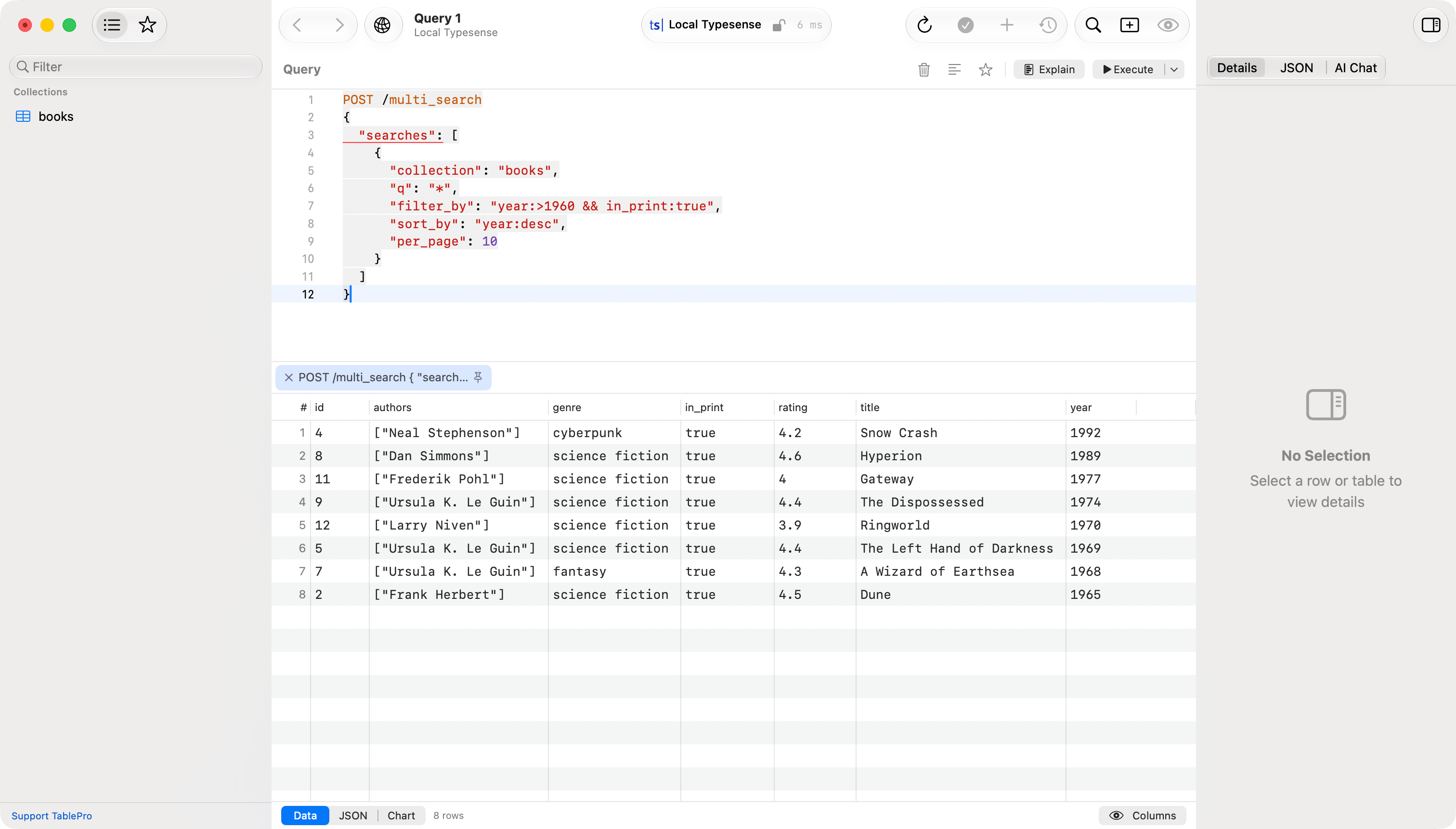
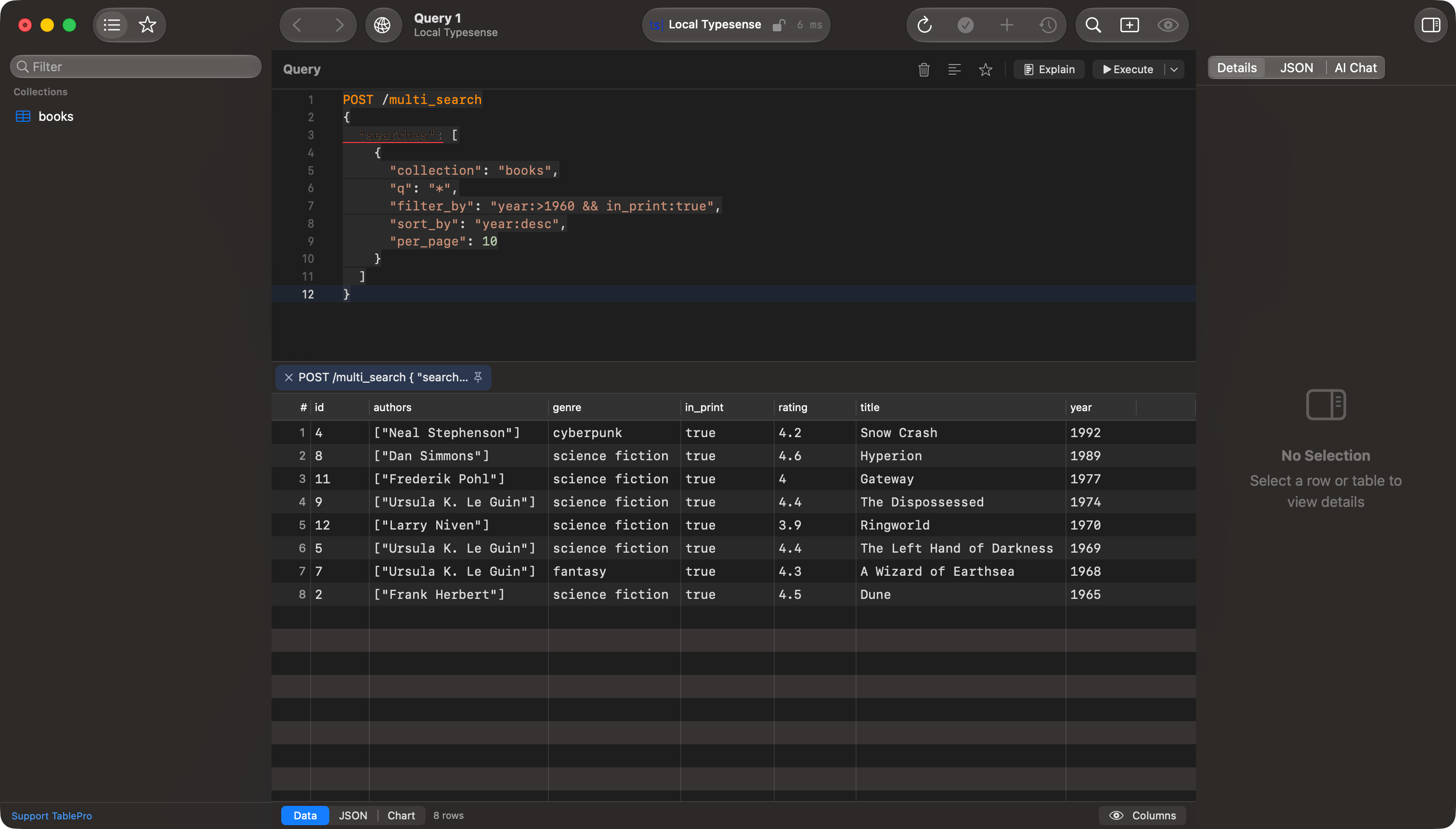
A multi_search request and its result grid
hits renders as a grid of documents, and so does a multi_search holding a single search. A JSON array renders as a grid of objects and GET /collections/:name/documents/export renders its JSONL the same way. Anything else, a multi_search batch included, comes back as pretty-printed JSON in a single cell.
Creating a collection happens here, with POST /collections. The structure editor does not write schema changes.
SSL/TLS
The connection’s SSL mode picks the scheme: Disabled talks HTTP, anything else talks HTTPS. Typesense Cloud is HTTPS on port 443. Skip TLS Verification on the Options tab accepts any certificate, which covers a self-signed proxy in front of a local node. See SSL/TLS for the concepts.Limitations
- No transactions. Each console request, and each row you save, is its own HTTP call.
- No views, no triggers, no routines, and no foreign keys. Typesense has none of them.
- The structure editor is read-only. Change a schema with
POST /collectionsand the collection alias endpoints in the console. - No import. Load documents with
POST /collections/:name/documents/importin the console. - is NULL, is not NULL, is empty, is not empty, matches regex and ends with are refused in the filter bar. Ends with needs a field created with
infix: true, which the filter bar cannot reach. - A filter value containing a backtick is refused. Match on a value without one, or write the filter in the Raw SQL column.
- The console takes a method and a path, not SQL.
DELETE FROM bookslooks like an HTTP verb and a path, so it is refused rather than sent.
Troubleshooting
Forbidden - a valid x-typesense-api-key header must be sent.
The key was missing or wrong. Check API Key against the value the server was started with, or the key you created in Typesense Cloud.
Could not find a field named … in the schema for sorting.
The console asked to sort a field the schema does not mark sort: true. Add sort to the field with a schema change, or sort on a different column. The grid drops such a sort instead of sending it.
Only upto 250 hits can be fetched per page.
A console request asked for more than 250 in oneper_page or limit. Split it across pages with offset and limit, or put several searches in one POST /multi_search.
Could not find a filter field named … in the schema.
The filter names a field the collection does not declare. On an auto-schema collection the field appears only once a document carries it; reload the table’s structure after indexing one.
Not an int32
A filter or a document sent text where the field’s type wants a number. Check the value, and that1965.0 is not being written into an int32 field.
Related
- Elasticsearch, the other search engine with a request console
- Filtering
- Import & Export