

127.0.0.1 and nothing else: no remote mode, no TLS certificate, no setting that opens it to your network. Claude Desktop, Claude Code, Cursor, and Zed reach your databases through the connections you already saved, and never see a password.
This page covers the Settings > MCP pane. The protocol itself, the tool catalog, the prompts and the token model live under Developers.
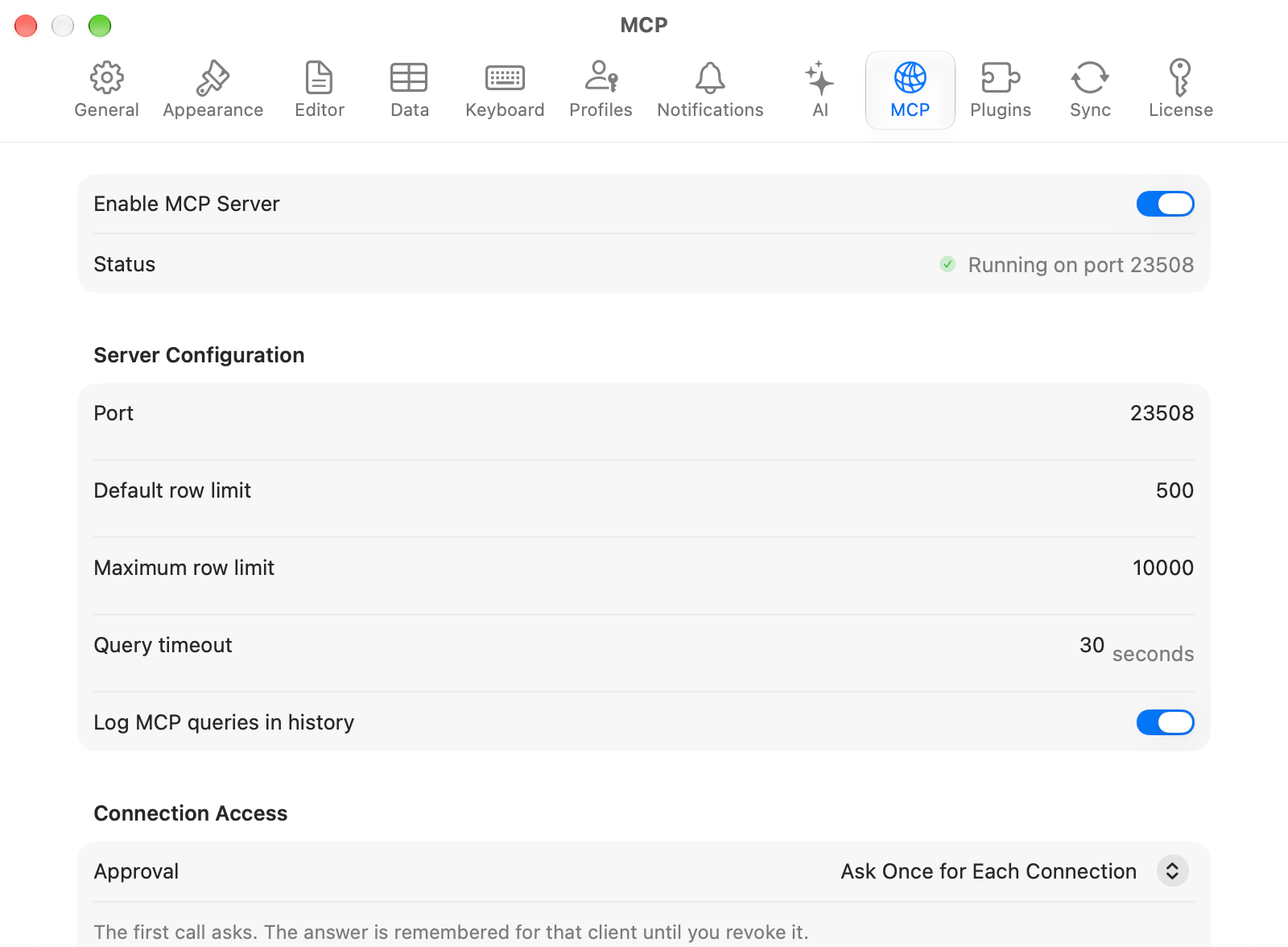
MCP server settings
Starting and stopping
Open Settings > MCP and turn on Enable MCP Server. The Status row underneath is how you check it before touching a client config: it reads Running on port 23508, or Stopped, or the reason it failed. With the toggle off, nothing starts the server. A client that launches the bundledtablepro-mcp bridge gets “The TablePro MCP server is turned off” within a second instead of a timeout, and pairing an extension stops at the same message with Open MCP Settings.
While it is only answering a client, TablePro stays out of the Dock and the app switcher. It appears in both, with its menu bar, once it has a window on screen, including one a client asked it to open. A TablePro the bridge launched while the toggle is off quits again.
The default port is 23508. If it is taken, TablePro asks the kernel for a free one instead. Either way the real port goes to ~/Library/Application Support/TablePro/mcp-handshake.json, which the bridge reads, so a client config never carries a port.
Server configuration
A tool can ask for fewer rows or a shorter timeout, never for more than the maximum.
Connecting a client
Click Connect a Client… and pick Claude Code, Claude Desktop, Cursor, or Zed. Each shows numbered steps and a copyable snippet pointing at the bundled bridge. Paste it into the client’s own config; TablePro does not write to other apps’ files. For VS Code, Cline, Continue, Windsurf, Antigravity, Goose, the HTTP transport, and a client that connects but lists no tools, see MCP Clients.Connection access
The first time a client reaches one of your connections, TablePro asks. Approval under Connection Access decides how often it asks after that.
Leave it at Ask Once for Each Connection unless a client runs unattended, in which case Never
Ask stops the prompt from waiting for someone who is not there. Approvals already given are listed
underneath, each with Forget.
Approval decides only whether you are asked. It grants nothing: a connection Blocked for
external clients stays blocked, a Read Only one stays read only, a connection whose AI policy is
Never is refused, and Safe Mode still confirms
destructive statements. Never Ask is not a way to skip any of those.
The question always arrives as a dialog on your Mac, never through the client. A client that could
answer it in its own interface could also answer it without asking you, and this is the gate that
decides whether it reaches the connection at all.
The dialog does not take focus from the app you are typing in. TablePro’s Dock icon bounces until
you switch to it, Deny is the default button, and Return and Escape both deny. Allow takes a
click.
Nothing here times out. Whoever sent the request decides how long to wait for you, and an answer
counts whenever you give it.
Connections hidden from AI in a launcher
A connection whose AI policy is Never is left out of every client’s connection list. To see it in a launcher such as Raycast anyway, turn on Allow apps to list connections hidden from AI, then pair the launcher and tick List connections hidden from AI on the approval sheet. The launcher then lists those connections with their user names, and opens them in TablePro. It still cannot query them, and Blocked connections stay hidden. Turning the setting off stops every app at once. Tokens that hold this grant read Lists connections hidden from AI in the token list.Authentication
Every request needs a token, including one from your own Mac. The bundled bridge mints its own, so a client set up through Connect a Client… needs nothing from you; an HTTP client or a launcher needs a token you generate or pair. Create, scope, allowlist, expire and revoke tokens in this section, described in Tokens.Activity and connected clients
View Activity… opens the MCP Activity window, also on TablePro > MCP Activity…. It has two sections:- Activity Log: every authentication, tool call, resource read and query, with the token behind it, the category, the connection, and the outcome. Filter by time, category or token, search, and export the filtered view to CSV. Retained for 90 days. Statements are recorded as a SHA-256 digest, not as text.
- Connected Clients: clients that have called in the last five minutes, with the client name, the token, and when they were first and last seen. Disconnect revokes that client’s token, so the client has to pair again.
Security model
- Clients work through your saved connections. Passwords never leave the Keychain and are not readable over MCP.
- AI access is set per connection, including blocking a connection from external clients entirely. A blocked connection is not even listed.
- Tokens carry scopes and can be limited to named connections. An unauthenticated local caller is read-only and can never be more.
- Writes go through the connection’s Safe Mode.
DROPandTRUNCATEneed a full-access token and the user’s approval every time. - Statements that read or write files, or run server-side code, are refused before they reach the driver.
- The reachable surface is the tool catalog, the resources and the prompts. Nothing else.
- Reaching the server from another machine means forwarding the port over SSH yourself, and owning what that exposes.
Reference
Protocol
Versions, required metadata, headers, and error codes.
Tool catalog
Every tool with its arguments and result shapes.
Prompts
Prompts rendered from the live schema, and completions.
Resources
Read-only resources for connections, schema, and history.
Tokens
Scopes, allowlists, expiry, revocation, activity log.
MCP Clients
Setup for every supported client, plus troubleshooting.