

ALTER TABLE you can read before it runs; the table on the server is untouched until you apply it.
Table structure view
What each object accepts
A view is not a table, and the grid offers only the edits the server will take on the object open in front of it. A refused + or - stays on screen, dimmed, with the reason in its tooltip; a cell the object will not let you change beeps instead of opening an editor. PostgreSQL and PGlite answer this per operation, so the tab does too:
A view and a materialized view differ in both directions:
ALTER TABLE … SET DEFAULT runs on a view and is refused on a materialized view, and CREATE INDEX is the other way round.
Every other engine edits a table and a partitioned table only. A view, a materialized view, a foreign table and a system table are read-only there. A MongoDB collection takes two edits, a field rename and a field removal; see MongoDB collections.
Columns tab
Columns are edited in place. Nullable, Primary Key, and Auto Inc are YES/NO dropdowns; Primary Key set to YES forces Nullable to NO and holds it there until the key comes back off. Type opens a picker of the engine’s types by category: search to filter, or type a parametric value such asVARCHAR(255) and press Return to use it as written. The cell reads the declared type and writes back what was typed. On PostgreSQL and PGlite the picker opens with a User-Defined group of the database’s enums, composites, domains and ranges, each listed schema-qualified as sales.status. See User-Defined Types.
Which remaining columns appear is the driver’s choice. Comment is there on most engines and writes the column comment. MySQL and MariaDB add Charset, Collation, and On Update; On Update set to YES on a TIMESTAMP or DATETIME column adds ON UPDATE CURRENT_TIMESTAMP at that column’s own precision, so TIMESTAMP(6) gets ON UPDATE CURRENT_TIMESTAMP(6).
Default
The cell holds the SQL that followsDEFAULT, so a string literal carries its own quotes and an expression is written the way the engine spells it. Click the chevron for the engine’s own list.
Typing straight into the cell is the same as SQL expression, so
pending is a column reference and 'pending' is the string. Text does the quoting and escaping for you.
On MySQL and MariaDB a nullable column declared without a default has DEFAULT NULL, so its cell reads NULL, and No default on a nullable column saves as NULL.
Setting Nullable to NO, or Primary Key to YES, clears a NULL default. A column you change so that it refuses NULL and defaults to NULL is reported before anything is saved.
Auto-increment has its own Auto Inc field.


Every Default cell carries the chevron that opens the list
ALTER TABLE … SET DEFAULT. SQLite, libSQL and Cloudflare D1 have no such statement, so the change is made by recreating the table, reviewed first like any other rebuild. Snowflake can only remove a default, and saving one there is refused with Unsupported schema operation.
Generated columns
PostgreSQL, CockroachDB, PGlite, MySQL, MariaDB and SQLite add two more fields. Generated is a menu of Not generated, STORED and VIRTUAL; Expression holds the SQL the value is computed from. Set both on a new row and the column is created asGENERATED ALWAYS AS (expression). PostgreSQL 11 and earlier have no generated columns, so on those servers neither field appears.
The keyword is always written out. PostgreSQL 17 and earlier accept STORED only, PostgreSQL 18 made VIRTUAL the default, and MySQL and MariaDB default to VIRTUAL, so leaving it implicit would mean different columns on different servers.
Generated column fields on the Columns tab
ALTER TABLE refuses cannot add a STORED column there, so STORED is reachable only when the table is created.
Type picker popover
Cmd+Shift+N. Select rows and click - or press Delete to mark them for removal.
Flag Primary Key on one column, or several for a composite key in one PRIMARY KEY (col1, col2) clause. On an existing table that becomes a drop of the old constraint followed by an add.
Drag a column row to reorder it, or right-click one and choose Move Column Up or Move Column Down. Both are dimmed with the reason spelled out under them while unsaved changes exist, while the list is filtered or sorted, on anything but a table, and on an engine that cannot change column order.
What the drag does depends on the engine:
Everything that runs goes to query history rather than the change queue.
Indexes tab
To replace an index, delete it and add the new one under the same name in one save, or choose Duplicate on its row, edit the copy and delete the original. The old index is dropped before the new one is created. Renames in one save may pass names along, such as
b to a and c to b: each runs once the name it takes is free, and two indexes that swap names are dropped and created again. On MySQL and MariaDB, an index you change or replace in a save that changes no column runs as one ALTER TABLE, so a replacement the server rejects leaves the original index in place. Neither takes an index named PRIMARY, in any letter case, because that name belongs to the primary key: change the key with Primary Key on the Columns tab. DynamoDB takes one index change per save, see DynamoDB.
Expression keys
Type an expression into Columns asCREATE INDEX writes it, such as lower(email) or coalesce(first_name, last_name). A comma inside parentheses or a string stays part of its key. Text that names one of the table’s columns is that column, in any case and with or without parentheses around it.
A sort order is not typed here:
lower(email) DESC is flagged as a column that does not exist. A descending key, a collation or an operator class the index already has stays through a rename or a new condition, and goes when you edit Columns or Type.
Invalid indexes
A PostgreSQLCREATE INDEX CONCURRENTLY or REINDEX CONCURRENTLY that fails or is cancelled leaves an invalid index behind. It keeps its row in the list, and a line under the list names it. Queries skip it, but every write still updates it, and an invalid unique index still refuses duplicates. Delete the row and save to drop it, or run REINDEX INDEX on it in the SQL editor to build it again.
The DDL tab, SQL exports and Copy To leave an invalid index out, the same as pg_dump, and Compare & Sync never creates one on the target. An index on a partitioned table that is still waiting for a partition’s index to be attached is not flagged, and exports keep it.
Materialized views
A materialized view’s indexes list, add and drop the same way a table’s do. The line under the list says whether Refresh Materialized View can refresh it concurrently, which keeps other sessions reading the view while it runs:
The server answers the question, so an index left invalid by a failed
CREATE UNIQUE INDEX CONCURRENTLY does not count, even though it lists with Unique set to YES. The line updates after every save and every refresh.
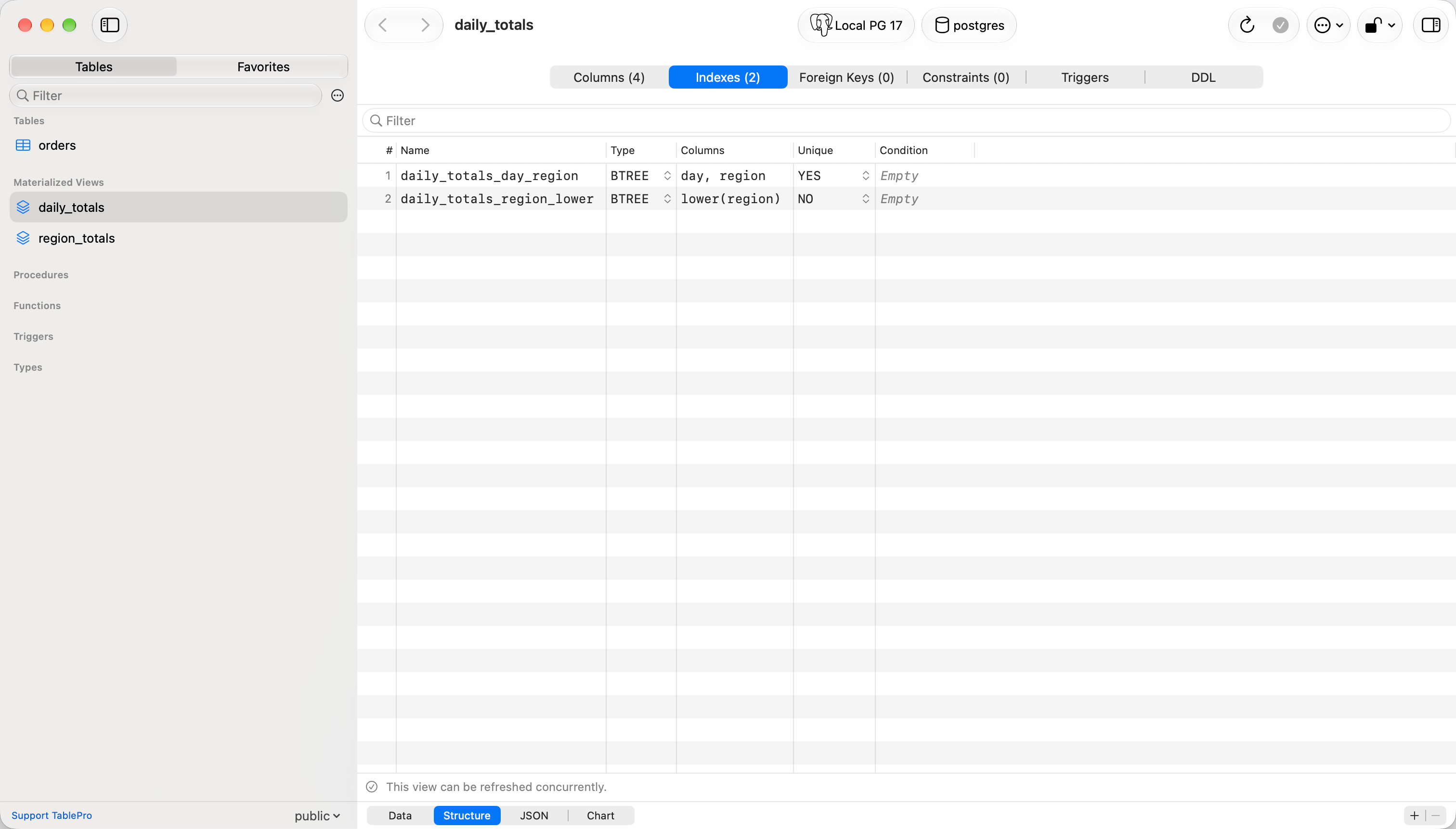
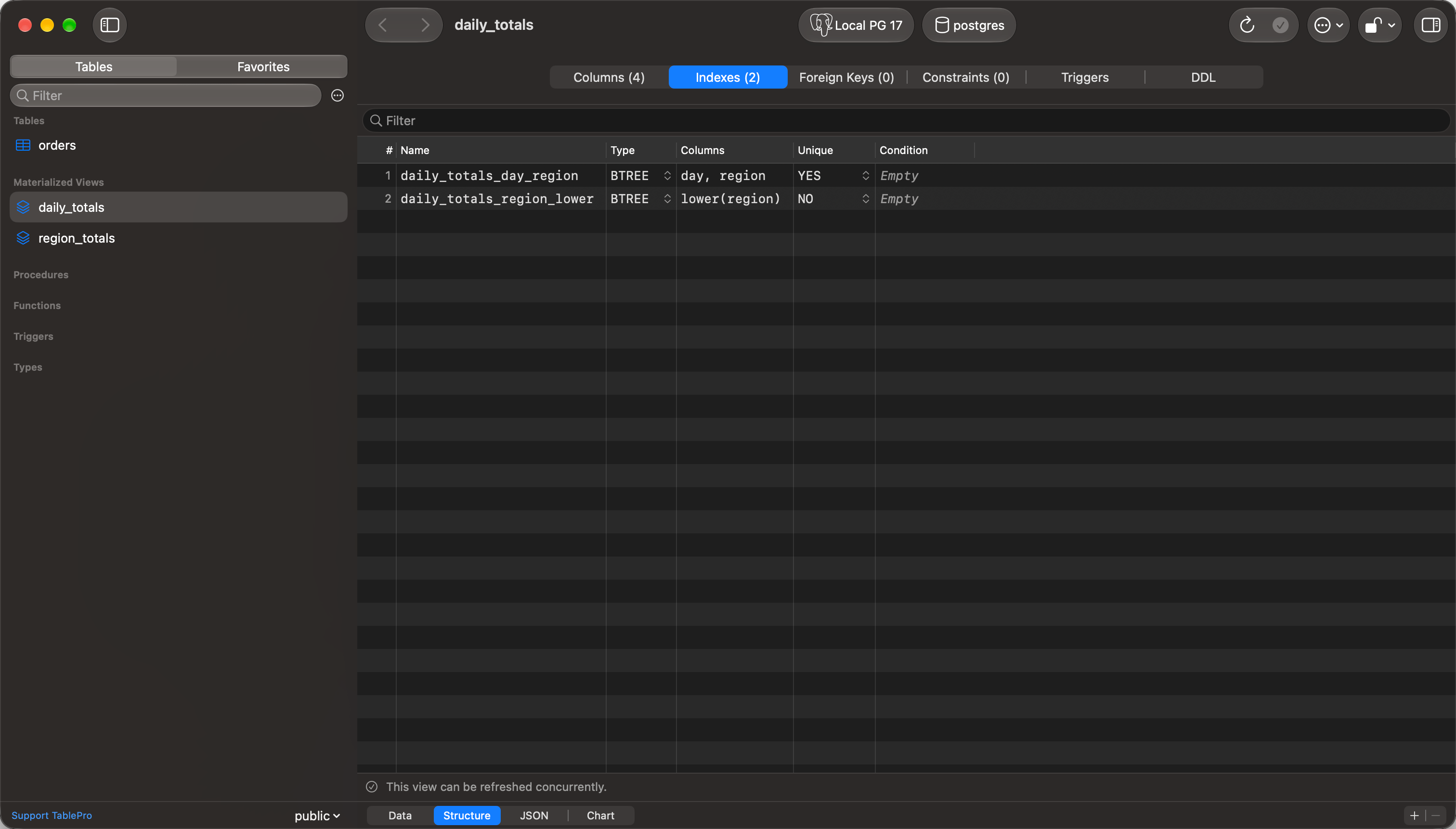
The unique index on day and region is what qualifies the view
Foreign keys tab
Right-click a foreign key and choose Open [table] to jump to the referenced table. Right-click any row in these three grids for Copy (the cell under the pointer), Copy Name, Copy Definition, Copy As (CSV, JSON, SQL), Duplicate, and Delete (
Delete). A row already marked for deletion offers Undo Delete. The same menu appears whether or not the row was already selected, and its row commands act on the whole selection.
Add Foreign Key and Remove Foreign Key sit under the list. Both are dimmed on an object that cannot carry a key and on an engine that cannot edit foreign keys, with the reason in the tooltip.
What the save does depends on the engine:
A rebuild carries everything else staged in the same save, and ends in
PRAGMA foreign_key_check scoped to the table. Rows that do not match the new key roll the whole rebuild back, and the count comes back in the error.
A column renamed or dropped in the same save runs as its own ALTER TABLE after the rebuild, so the new name reaches every index, trigger and view. A drop that would leave one of those naming a column that is gone fails the whole save rather than committing it broken.
Constraints tab
Check constraints are table-level, so a rule spanning two columns is one row here rather than something hidden on a column.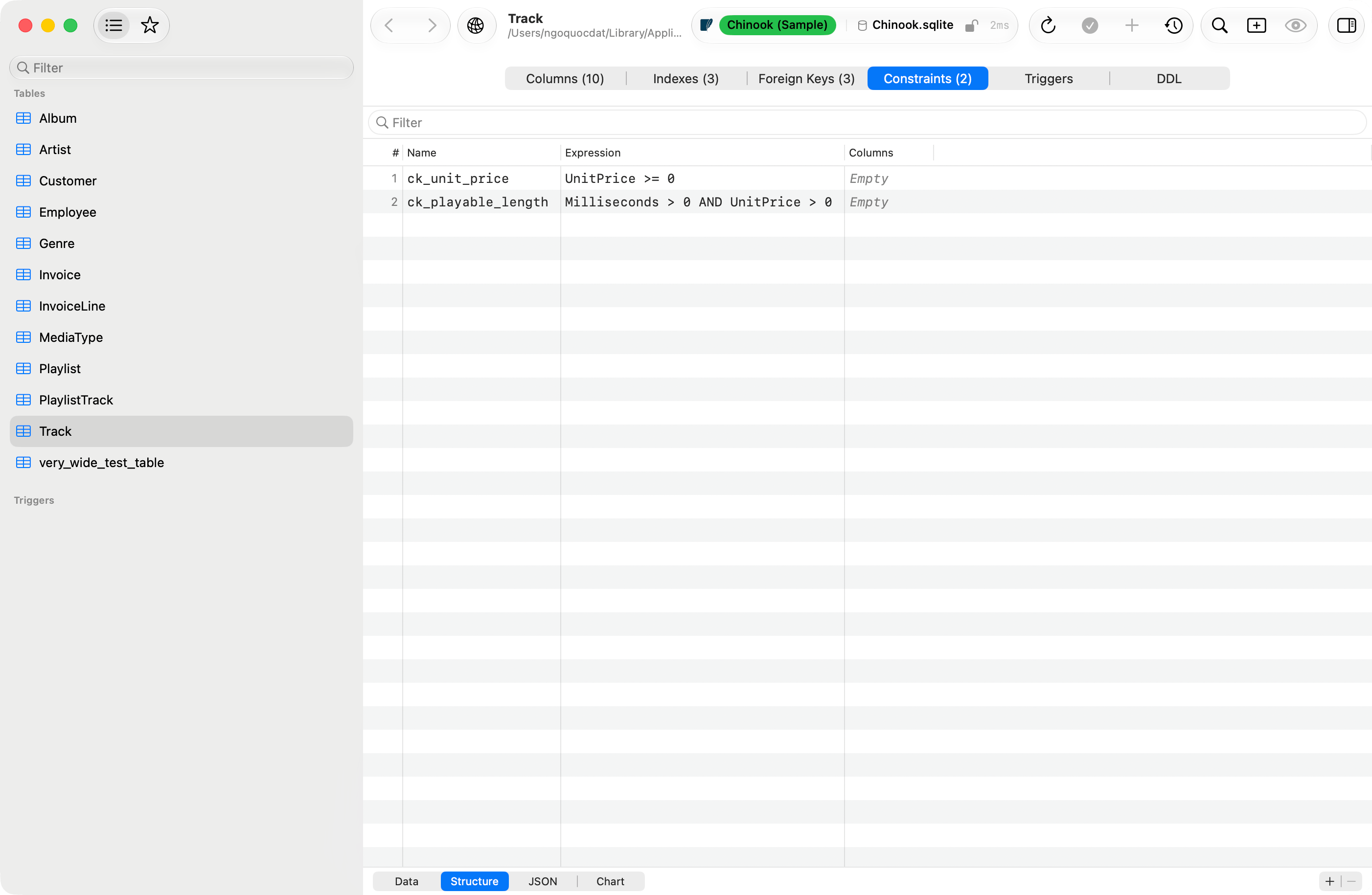
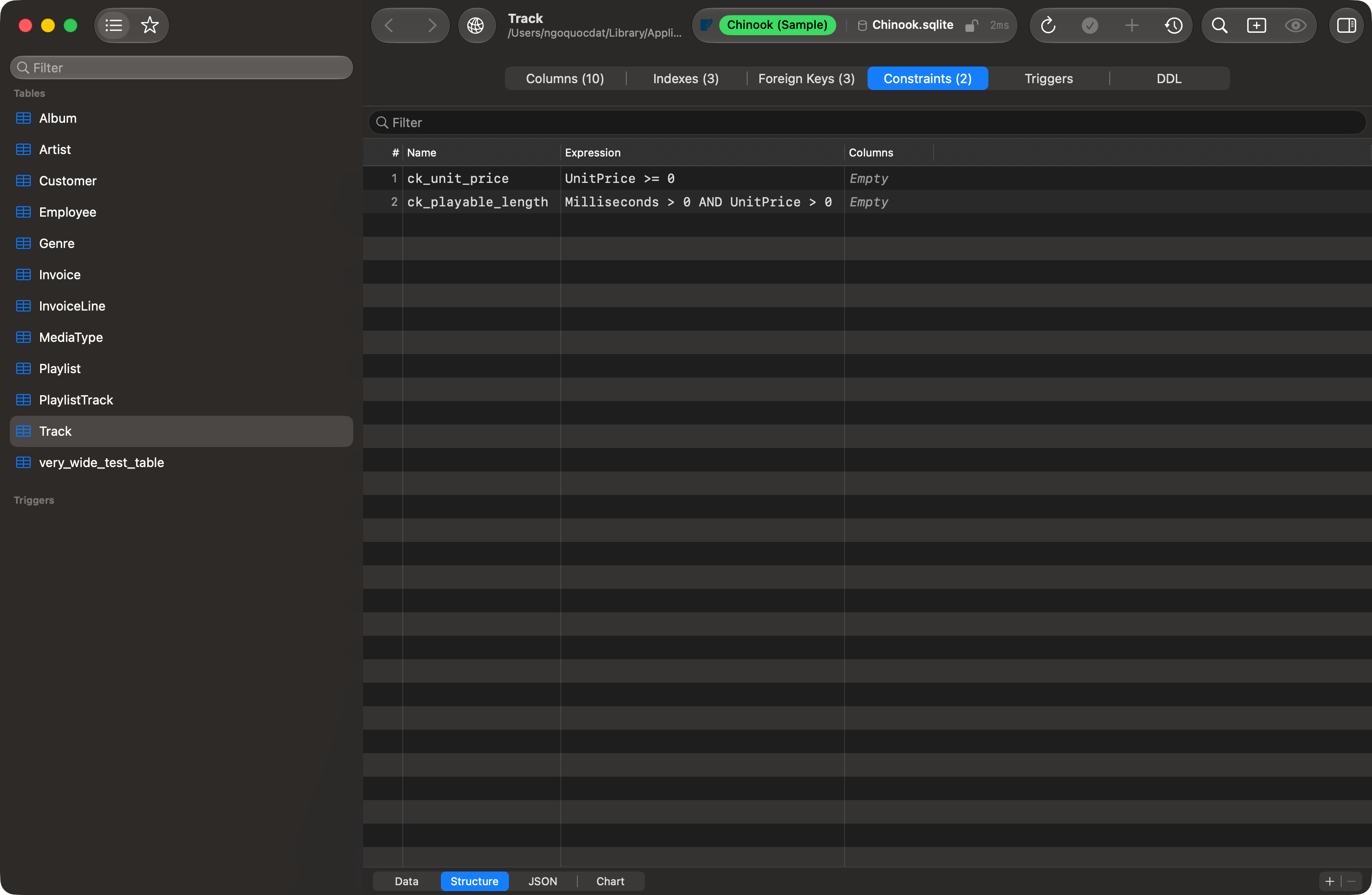
Constraints tab
RENAME CONSTRAINT where the engine has one. Changing the expression drops and re-adds it, because no engine can alter a check in place. Both the re-add and a brand-new constraint scan every existing row and fail if any row violates the rule, so a failed save means the data disagrees with the constraint. Every drop runs first, and a rename waits for the rename that frees its name, so a constraint added or renamed in the same save can take the name of one you deleted or renamed. Two constraints that swap names are dropped and added back, which scans the table.
A constraint named C beside one named c is refused before anything runs, on every engine, because SQLite and MariaDB treat the two as one name. Give the second constraint another name.
The tab is hidden on engines with no check constraints. SQL Server lists and edits them, but has computed columns rather than generated ones, so it gets this tab and not the two column fields.
It is hidden on MySQL before 8.0.16, MariaDB before 10.2.1, TiDB before 7.2 and OceanBase before 4.0 as well. Those servers accept a CHECK clause, answer Query OK, and throw the rule away, so there is nothing to list and nothing a save could keep. Upgrade, or enforce the rule with a trigger.
SQLite is the one engine where listing and editing part company. The tab appears on every version, but + and - need SQLite 3.53.0 or later, the release that added ADD CONSTRAINT and DROP CONSTRAINT to ALTER TABLE. The driver links the system SQLite, so the version is the one macOS ships. On an older one the constraints still list, read-only.
SQLite also accepts two constraints under one name, treats c and C as the same name, and DROP CONSTRAINT removes the first one it finds. When two listed constraints share a name, a save that changes or deletes one of them and leaves the other is refused before anything runs: change or delete all of them in the same save. A save that leaves them both alone goes through.
Saving changes
Nothing here reaches the server on its own. Column, index and key changes queue on the tab, Preview SQL (Cmd+Shift+P) shows the statements they will produce, and Cmd+S runs them.
Change Tracking covers the queue, undo (Cmd+Z) and redo (Cmd+Shift+Z). A save runs on the tab’s own connection, database, and schema, the ones it was opened on, and never moves the sidebar or the toolbar.
- Save Changes (
Cmd+Sor the toolbar checkmark) applies the queue. - Preview SQL (
Cmd+Shift+P) shows the statements Save Changes would run, on the tab’s own schema, and runs none of them. A save that recreates the table previews as its rebuild script, with what the rebuild cannot carry over.
Generated DDL preview
When one statement fails
A save is often several statements, run in order. Engines with transactional DDL roll the whole set back; MySQL, MariaDB, and Oracle commit each one as it runs, so everything before the failure has landed while the queue still holds all of it. An Error Applying Changes sheet reports what the server said: refresh before saving again, or the second save replays work the server already did.Triggers tab
Lists Name, Timing (BEFORE, AFTER, INSTEAD OF), Event (INSERT, UPDATE, DELETE), and Enabled where the engine reports it. Select one to read itsCREATE TRIGGER statement from the catalog, with Copy and Open in Editor. New Trigger, Edit, and Delete sit in the action bar; the editor opens the trigger’s real DDL, including the trigger function on PostgreSQL. Trigger changes run on their own connection, like a structure save. A materialized view or a system table cannot carry a trigger, so the tab has no action bar there.
Triggers are available for MySQL, MariaDB, PostgreSQL, SQLite, SQL Server, Oracle, libSQL, and Cloudflare D1; the tab is hidden elsewhere. Oracle does not return the trigger body, so the viewer and the editor start from the trigger header alone.
DDL tab
Read-onlyCREATE TABLE with syntax highlighting and font size controls. Copy, Export as a .sql file, and Open in Editor send it onward. On PostgreSQL the CREATE SEQUENCE and CREATE TYPE … AS ENUM statements the table depends on are prepended, so the script runs on an empty database, and the table’s COMMENT ON statements follow it.
Open the tab on a view and it carries that view’s own CREATE VIEW or CREATE MATERIALIZED VIEW instead, the same statement Show DDL opens. A materialized view’s indexes follow it.
Parts tab (ClickHouse)
Lists partitions and parts fromsystem.parts. Optimize merges parts; Drop Partition and Detach Partition act on the selected partition. Detached data stays on disk and is unreadable until it is re-attached.
Creating a new table
Choose Database > New Table…, or right-click empty space in the sidebar and choose New Table…. The tab holds a Table Name field (with Engine, Charset, and Collation pickers on MySQL and MariaDB), the same three editing grids, and a SQL Preview tab carrying the live statements it will run. Create Table (Cmd+Enter or Cmd+S) executes it and opens the new table.
On the Foreign Keys grid, Columns, Ref Table, and Ref Columns open menus of the new table’s own columns, the database’s tables, and the referenced table’s columns. Each menu ends in Custom… for a name the list does not carry, and picking a second entry in a comma-separated cell appends to it.
Name is optional on a foreign key. Left blank, no CONSTRAINT clause is written and the engine names the constraint itself.
A row that is started and unfinished is never dropped from the generated SQL. Create Table dims and the reason sits beside it, naming the grid and the row: a foreign key with no referenced table, an index with no name, two columns sharing a name. Delete the row or finish it.
Indexes run as their own CREATE INDEX statements after the table, in one transaction where the engine has transactional DDL.
Visual table creation is supported for MySQL, MariaDB, PostgreSQL, PGlite, SQLite, SQL Server, ClickHouse, DuckDB, Oracle, Snowflake, libSQL, Cloudflare D1, Trino, Teradata, Dameng, and MongoDB. DynamoDB uses a form instead. On every other engine New Table… is dimmed.
MongoDB collections
A collection’s fields are inferred from its first 200 documents: top-level field names are unioned across the sample, and each field takes its most common BSON type. Fields the collection’s$jsonSchema validator declares follow, including ones no sampled document holds. A field is nullable when the validator takes null in it, as missing fields and null describes; required decides only whether a document must have the field. _id comes first, marked as the primary key. The DDL tab shows indexes as createIndex() commands for mongosh, plus the validator and capped-collection options where present.
Edit a field’s Name to rename it in every document, or remove its row to remove it from every document. Type, Nullable, adding a field and the Indexes tab stay read-only. Renaming and removing fields shows the statements a save runs and what refuses one.
Limitations
- Changing a primary key on an existing table works on MySQL, MariaDB, PostgreSQL, PGlite, SQL Server, DuckDB, Snowflake, and Dameng. Elsewhere the dropdown accepts the edit and the save produces nothing for it: rebuild the table by hand.
- Check constraints and generated columns have no field in the grid. Both show in the DDL tab; change them by running DDL yourself.
- Cassandra / ScyllaDB: add and drop column only, no index editing, no visual table creation.
- ClickHouse: the Indexes tab drops a data-skipping index but cannot add or change one. A save or a new table that tries is refused before anything runs. Run
ALTER TABLE … ADD INDEX … TYPE bloom_filterin the SQL editor instead. - Redshift, CockroachDB, BigQuery, Spanner, Elasticsearch, Typesense, SurrealDB, Beancount: structure is read-only.
- Redis, etcd, DynamoDB: no table schema to edit.
Refreshing
Database > Refresh (Cmd+R) or the toolbar refresh button reloads structure from the server; changes made through TablePro refresh on their own. A refresh reads the tab’s own database and schema, not the sidebar’s current selection. A tab with queued changes keeps them when another tab or window changes the table, and refreshes once they are saved, undone or discarded.