> ## Documentation Index
> Fetch the complete documentation index at: https://docs.tablepro.app/llms.txt
> Use this file to discover all available pages before exploring further.
# User-Defined Types
> Browse a schema's enums, composites, domains and ranges, read each definition, and add or rename an enum's labels in place
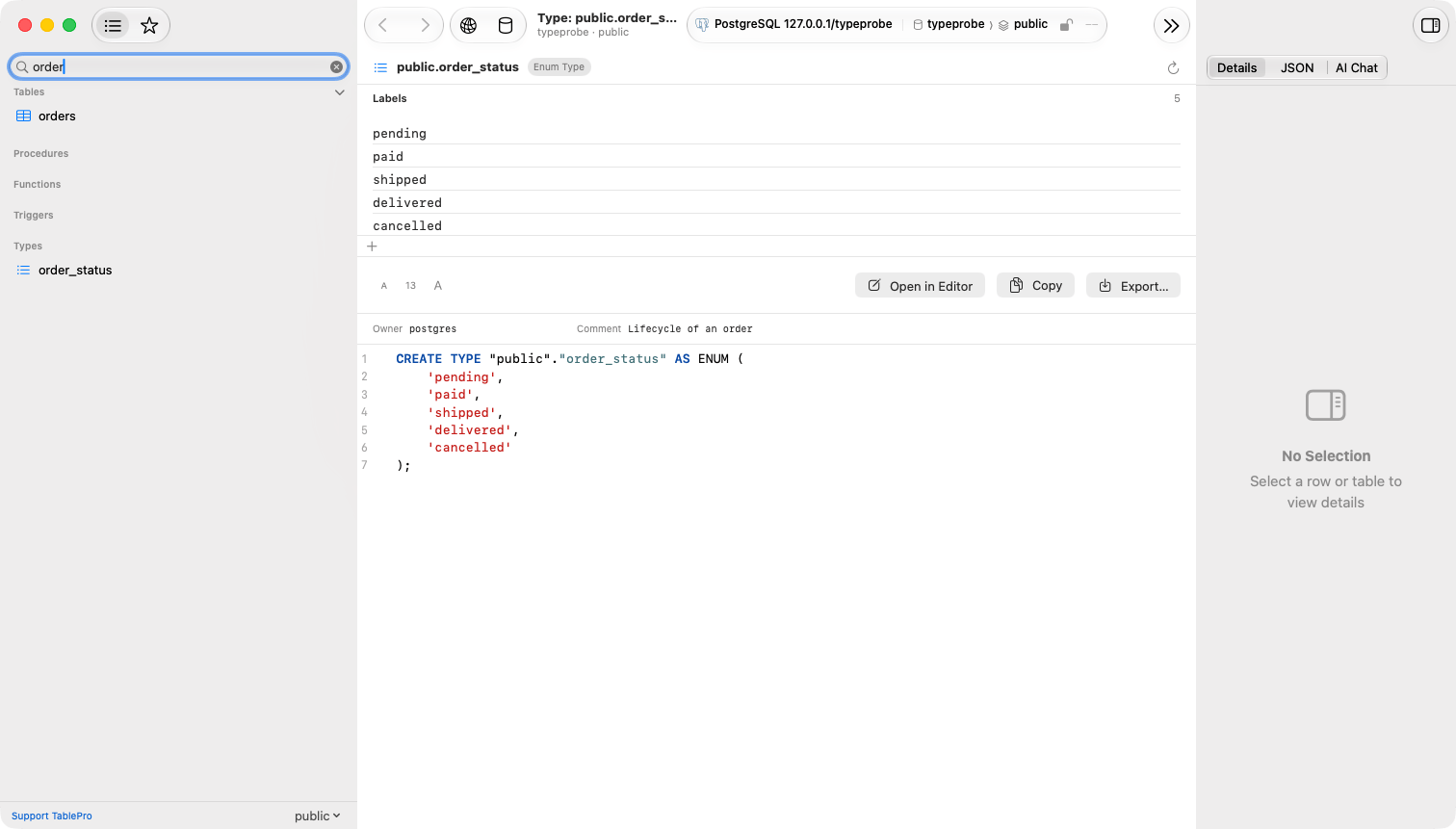
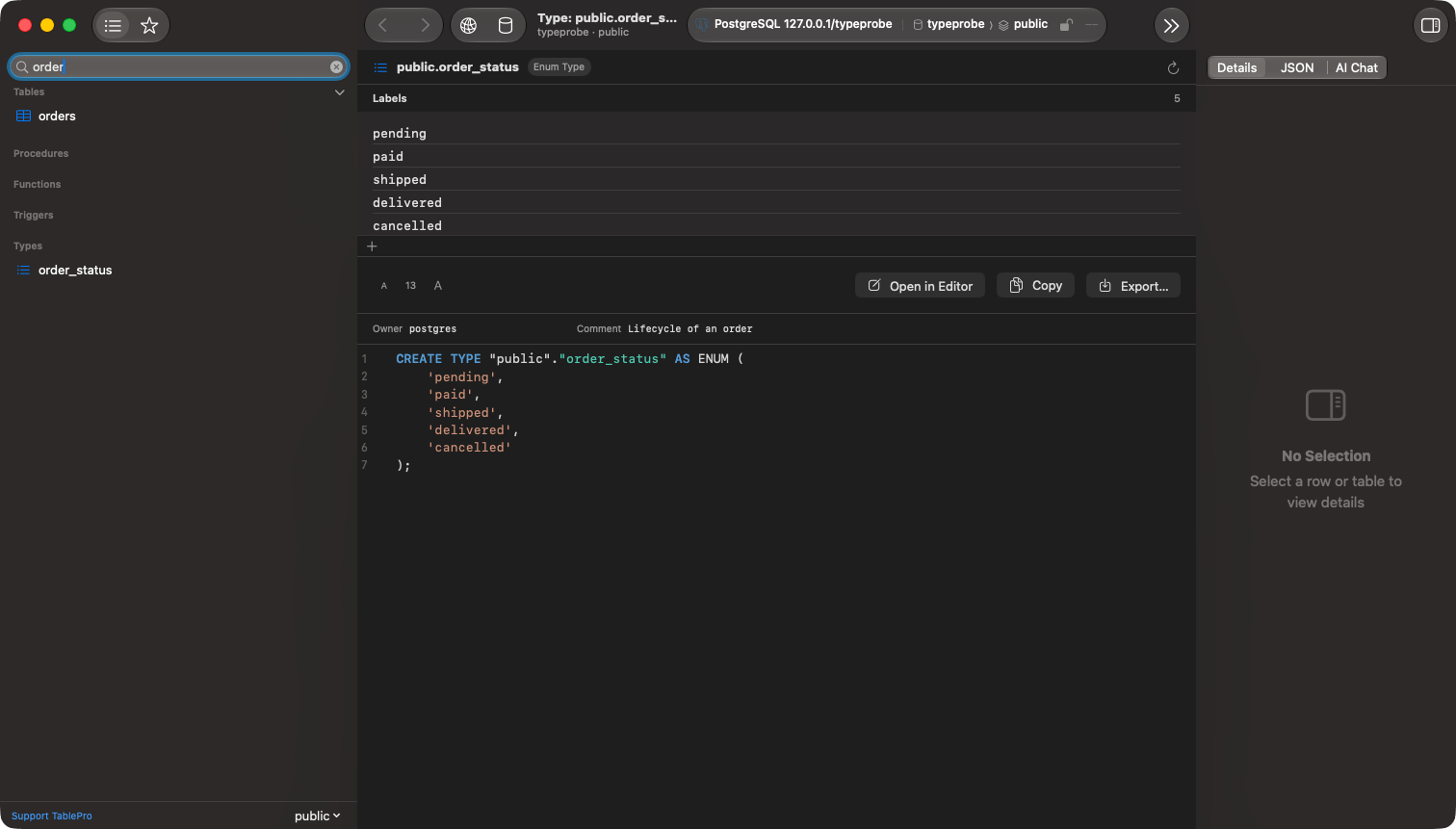
Expand a schema and **Types** sits beside **Functions** and **Triggers**, one row per enum, composite, domain and range the schema declares. Select a row and press Return, or double-click it, and the type's `CREATE` statement opens in a tab.
 ## Engine support
| Engine | Types listed | Enum labels editable |
| ------------------ | ---------------------------------- | -------------------- |
| PostgreSQL, PGlite | Enums, composites, domains, ranges | Yes |
| Every other engine | None | No |
A table's own row type, the array type created beside every type, the multirange created beside every range, and any type an extension installed are left out. A type in another schema is listed under that schema.
## Reading a definition
The definition is rebuilt from the catalog rather than read back as typed: comments inside the original statement are gone, names are quoted, and a domain's constraints appear in name order. The tab carries the same toolbar as a routine's source, **Copy**, **Export…**, **Open in Editor** and **Reload**, and beside the statement sit the properties the catalog reports: a domain's base type, a range's subtype, the owner, and the comment.
Hover a row in the sidebar for the same facts without opening it: an enum's labels, a composite's fields, a domain's base type.
## Editing an enum's labels
An enum's labels are listed above its definition in the order the server keeps them. Each edit runs as one `ALTER TYPE` statement the moment it is committed, on a connection of its own rather than inside a transaction open in a query tab; there is nothing to save afterwards, and the statement lands in the query history.
Click **+** under the list to append one, or right-click a label and choose **Add Label Before…** or **Add Label After…** to place it. Type the label and press Return. Escape discards it.
Double-click a label, or right-click it and choose **Rename…**, edit it and press Return.
Renaming needs PostgreSQL 10 or later. On an older server the **Rename…** item is absent and a double-click does nothing.
Safe Mode applies as it does to any schema change. A connection set to read-only shows the labels without the controls, and Confirm Writes asks before the statement runs.
### What cannot change
PostgreSQL has no statement that removes a label or moves an existing one. To drop a label, create a new type without it, switch every column over, and drop the old type; **Open in Editor** puts the current definition in a query tab as the starting point.
## Creating a type
Right-click the **Types** section and choose **Create New Type…**. A query tab opens with a `CREATE TYPE … AS ENUM` template addressed to that schema. Edit it, run it, then choose **Refresh** on the section.
## Using a type in a column
In a table's **Structure** tab, the column type picker opens with a **User-Defined** group listing the database's types ahead of the engine's. Every entry is schema-qualified and quoted where the name needs it, `sales.status` or `app."Order Status"`, so the column definition names the type and never a built-in of the same name. See [Table Structure](/features/table-structure#columns-tab).
## Finding a type
The sidebar filter matches a type by name. **File > Open Quickly…** (`Cmd+Shift+O`) indexes types alongside tables, routines and triggers, and choosing one opens its definition.
## When the definition is missing
| Message | What it means | What to do |
| ----------------------------------------- | -------------------------------------------------------------- | -------------------------------------------------------------------------------------- |
| … no longer exists | The type was dropped after the section was listed | Right-click the section and choose **Refresh** |
| This database cannot show the source of … | The driver listed the type but could not rebuild its statement | Read it from the properties beside the empty source, or query `pg_type` in a query tab |
## Engine support
| Engine | Types listed | Enum labels editable |
| ------------------ | ---------------------------------- | -------------------- |
| PostgreSQL, PGlite | Enums, composites, domains, ranges | Yes |
| Every other engine | None | No |
A table's own row type, the array type created beside every type, the multirange created beside every range, and any type an extension installed are left out. A type in another schema is listed under that schema.
## Reading a definition
The definition is rebuilt from the catalog rather than read back as typed: comments inside the original statement are gone, names are quoted, and a domain's constraints appear in name order. The tab carries the same toolbar as a routine's source, **Copy**, **Export…**, **Open in Editor** and **Reload**, and beside the statement sit the properties the catalog reports: a domain's base type, a range's subtype, the owner, and the comment.
Hover a row in the sidebar for the same facts without opening it: an enum's labels, a composite's fields, a domain's base type.
## Editing an enum's labels
An enum's labels are listed above its definition in the order the server keeps them. Each edit runs as one `ALTER TYPE` statement the moment it is committed, on a connection of its own rather than inside a transaction open in a query tab; there is nothing to save afterwards, and the statement lands in the query history.
Click **+** under the list to append one, or right-click a label and choose **Add Label Before…** or **Add Label After…** to place it. Type the label and press Return. Escape discards it.
Double-click a label, or right-click it and choose **Rename…**, edit it and press Return.
Renaming needs PostgreSQL 10 or later. On an older server the **Rename…** item is absent and a double-click does nothing.
Safe Mode applies as it does to any schema change. A connection set to read-only shows the labels without the controls, and Confirm Writes asks before the statement runs.
### What cannot change
PostgreSQL has no statement that removes a label or moves an existing one. To drop a label, create a new type without it, switch every column over, and drop the old type; **Open in Editor** puts the current definition in a query tab as the starting point.
## Creating a type
Right-click the **Types** section and choose **Create New Type…**. A query tab opens with a `CREATE TYPE … AS ENUM` template addressed to that schema. Edit it, run it, then choose **Refresh** on the section.
## Using a type in a column
In a table's **Structure** tab, the column type picker opens with a **User-Defined** group listing the database's types ahead of the engine's. Every entry is schema-qualified and quoted where the name needs it, `sales.status` or `app."Order Status"`, so the column definition names the type and never a built-in of the same name. See [Table Structure](/features/table-structure#columns-tab).
## Finding a type
The sidebar filter matches a type by name. **File > Open Quickly…** (`Cmd+Shift+O`) indexes types alongside tables, routines and triggers, and choosing one opens its definition.
## When the definition is missing
| Message | What it means | What to do |
| ----------------------------------------- | -------------------------------------------------------------- | -------------------------------------------------------------------------------------- |
| … no longer exists | The type was dropped after the section was listed | Right-click the section and choose **Refresh** |
| This database cannot show the source of … | The driver listed the type but could not rebuild its statement | Read it from the properties beside the empty source, or query `pg_type` in a query tab |